
For teams exploring AI assistance alongside HubSpot workflows.
Documentation-based assessment · How we reviewed it
Official demo / learning resources ↗
Our take on HubSpot Breeze Assistant
Worth considering if your team already works in HubSpot and wants to assess AI assistance against that business context. Judge the specific workflow you need rather than treating the wider AI platform as one interchangeable product.
- Best fit
- Context-aware business assistance
- Review scope
- Breeze Assistant within HubSpot; adjacent Agent Hub context
- Main watch-out
- Data readiness, access and feature costs
In this review
Who should consider HubSpot Breeze Assistant?
A candidate for an existing HubSpot workflow with maintained business data. For a standalone writing need, compare the total platform and setup requirements before deciding.
Why shortlist it
- An assistant within a business platform can provide a relevant place to start a workflow.
- Shared business context can help make the evaluation specific to your team’s task.
- Official documentation distinguishes assistant, agent and usage-based capabilities.
What to watch
- Incomplete or outdated business information can weaken the resulting draft or suggestion.
- Confirm what data is used and which users or features can access it.
- Assistant access should not be confused with access to every paid agent or workflow.
Features that matter in daily work
HubSpot presents Breeze Assistant as an AI assistant for teams. Its wider AI documentation now describes Agent Hub, where agents, workflows and business context are managed. These surrounding capabilities have their own access requirements; they are not all included simply because an assistant is available. Official product details ↗
1. Assistant in a business workflow
Breeze Assistant is positioned for work in the HubSpot environment. Evaluate a task grounded in authorized business context rather than judging only a general chat response.
2. CRM context
CRM-related work depends on accurate records and appropriate permissions. Audit a small set of source records before judging the usefulness of an AI-generated summary.
3. Adjacent agent capabilities
The wider product page now describes Agent Hub. Its agent examples are surrounding platform capabilities, not proof that every feature is included with Breeze Assistant.
4. Credits and administration
HubSpot documents credit management for usage-based capabilities. Confirm the entitlement and consumption rules for the particular action, account and subscription.
A closer look at HubSpot Breeze Assistant
These vendor images show the wider Agent Hub platform. They are context for the ecosystem, not evidence that every feature is part of Breeze Assistant.
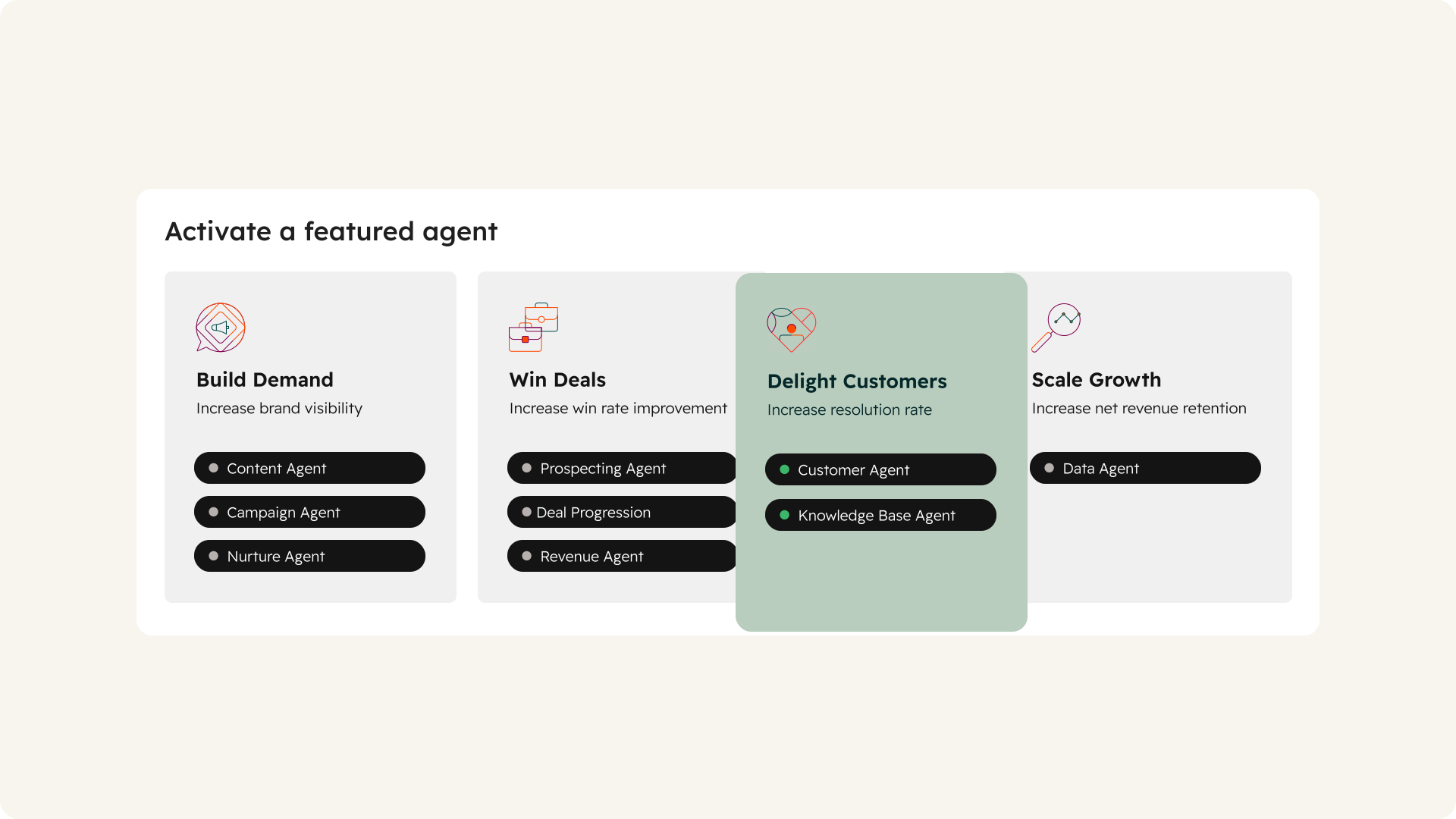

Visuals © provider / respective owners. Official source ↗ Vendor examples are not evidence of measured performance.
Practical workflows to evaluate
These are suggested evaluations, not tests we performed. Use material you own or have permission to share.
Check a CRM summary
Using authorized sample records, request a concise summary of the known facts and clearly separate missing information.
Evaluate: Compare names, stages and dates with the underlying records. Avoid using the exercise to disclose real customer details unnecessarily.
Draft a follow-up
Prepare a draft follow-up using an approved offer and permitted context. Keep it unsent for human review.
Evaluate: Check recipient, product claims and commitments. Never treat a suggested draft as authorization to contact a customer.
Map a proposed automation
Write down the trigger, records, permissions, cost and approval owner for one prospective AI workflow.
Evaluate: Verify current feature access and credits before enabling actions. Begin with a preview or review step rather than unattended changes.
Plans, allowances and value
Check the requirements of the exact HubSpot feature you intend to use. HubSpot’s documentation explains that some AI capabilities require particular subscriptions or credits. Review included allowances, credit consumption and billing controls before enabling a paid workflow.
| Option | What to check | Decision rule |
|---|---|---|
| Assistant access | Account, seat and subscription eligibility for the exact feature | Check your own portal rather than assuming all AI features are bundled. |
| Credit-consuming capabilities | Included credits, usage rates, add-ons and billing behavior | Estimate a realistic number of approved actions. |
| Broader platform / enterprise | Hub subscriptions, governance and agreement requirements | Separate existing CRM value from the incremental AI cost. |
Check official plan details ↗ Confirm your billing interval, currency, applicable tax, renewal terms and feature availability before subscribing. Promotional prices can differ from renewal prices.
Limits, privacy and responsible use
Poor CRM data can become a confident but misleading summary. Customer communication and record changes require clear approval rules. Agent Hub media below illustrates the wider platform; it is not a review of every agent or a claim of assistant entitlement.
Check the provider’s current data terms, account settings and your organization’s policy before uploading client or confidential material. A paid subscription alone is not authorization to share information.
Documentation establishes advertised capabilities, not accuracy on your task. We have not measured speed, reliability, time savings or business outcomes. Keep an accountable person responsible for approval.
Alternatives worth comparing
Compare the job you need done rather than assuming every AI tool is a direct replacement. These are workflow alternatives, not a performance ranking.
A candidate for an existing HubSpot workflow with maintained business data. For a standalone writing need, compare the total platform and setup requirements before deciding.
Common questions
Is Agent Hub the same thing as Breeze Assistant?
This review keeps the assistant scope separate. The broader platform page includes adjacent agent capabilities with their own requirements.
Does paying for a Hub include every AI capability?
Do not assume that. Check the exact subscription, seat, entitlement and credit rules in your portal.
Should an assistant send customer messages automatically?
Only within a deliberately authorized process. Verify recipients, claims and approval rules before enabling external actions.
Have you tested and rated this tool?
This is a research-based assessment of official documentation. We have not recorded hands-on tests or assigned a numerical score. The recommendations explain suitability and trade-offs.
Sources and review method
We reviewed official product and plan information on 14 October 2026. Suitability judgments and suggested trials are our editorial assessment. Media is credited to its provider and does not establish hands-on testing. Features, prices and rollouts can change.
- Official Breeze Assistant information
- Agent Hub scope and access requirements
- HubSpot Credits and billing
- Official product and media source
No affiliate tracking has been added to these links. Editorial responsibility: AI Tools Hotlist editorial desk. Editorial standards · Suggest a correction · More reviews.