
For creators exploring AI image generation and visual editing.
Documentation-based assessment · How we reviewed it
Our take on Adobe Firefly
Worth considering when you need to explore visual directions and refine a selected result. Evaluate the editing workflow and the number of usable outputs, not just the visual impact of the first generation.
- Best fit
- Visual concepts and image variations
- Review scope
- Generative visual creation and editing
- Main watch-out
- Model choice, credit usage and output checks
In this review
Who should consider Adobe Firefly?
A useful shortlist option for visual exploration. Choose a plan around a repeatable production task and verify the relevant terms before publishing an output.
Why shortlist it
- Generation and editing options can support several stages of a visual brief.
- A plan comparison makes feature access and credit allowances visible before purchase.
- Different creative surfaces may offer a path from concept to further refinement.
What to watch
- The model and feature you select affect what is available and how credits are used.
- Inspect details, visual consistency and suitability for the intended use.
- Do not assume every model has identical usage terms or included allowances.
Features that matter in daily work
Adobe presents Firefly as a collection of generative creative tools, including image generation and editing. Its plan comparison separates standard image features from premium capabilities and lists access to Adobe and partner models. Official product details ↗
1. Image generation and editing
Firefly includes image generation and editing workflows. Compare candidates at the final display size, looking for distorted details, unreadable lettering and mismatched lighting.
2. Video exploration
The product page includes video creation and refinement. Test continuity across frames and the usefulness of an exported clip rather than judging a single attractive thumbnail.
3. Creative boards
Boards support visual exploration. Keep reference rights and the intended visual direction clear; a mood board is an input to a design decision, not a finished campaign.
4. Adobe and partner models
The platform includes Adobe and partner models. Identify which model produced an asset and verify its applicable access, credit and usage terms before production.
A closer look at Adobe Firefly
Official provider imagery, credited below. These are vendor examples, not outputs from our tests. Select an image to enlarge it.

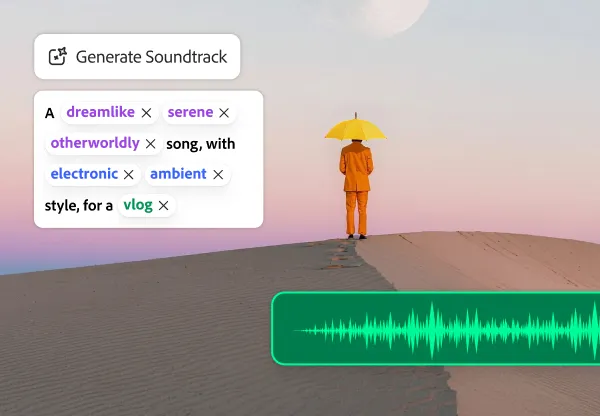

Visuals © provider / respective owners. Official source ↗ Vendor examples are not evidence of measured performance.
Practical workflows to evaluate
These are suggested evaluations, not tests we performed. Use material you own or have permission to share.
Explore a visual direction
Generate three concepts for a fictional event poster using a specified palette and generous empty space for manually placed text.
Evaluate: Compare composition, artifacts and editing effort. Do not use a generated brand mark as evidence of trademark clearance.
Refine an image
Using an image you have permission to edit, request one localized change while preserving the rest of the composition.
Evaluate: Inspect the surrounding edges, reflections and subject details. Record unintended changes as well as successful edits.
Evaluate a short clip
Create a short conceptual clip from a permitted brief, then inspect the beginning, middle and end at normal playback.
Evaluate: Check temporal consistency and export suitability. Track credits used by rejected attempts as part of the cost.
Plans, allowances and value
Compare the current Firefly plans and their generative credits. Adobe distinguishes standard and premium features, so a monthly allowance alone does not tell you how many times you can perform a particular task. Verify the selected model and feature in the official comparison.
| Option | What to check | Decision rule |
|---|---|---|
| Free access | Available tools and current generation allowances | Assess a small creative task before subscribing. |
| Paid Firefly plans | Credits, standard/premium features, models and export needs | Compare the actual feature mix, not only the monthly headline. |
| Team / business options | Licensing, administration and production requirements | Confirm organization-specific terms and the selected model. |
Check official plan details ↗ Confirm your billing interval, currency, applicable tax, renewal terms and feature availability before subscribing. Promotional prices can differ from renewal prices.
Limits, privacy and responsible use
An attractive generated asset may still have visual errors or usage restrictions. Review recognizable people, trademarks and reference materials. Different models and premium features can consume different allowances; inspect the export and applicable terms before publishing.
Check the provider’s current data terms, account settings and your organization’s policy before uploading client or confidential material. A paid subscription alone is not authorization to share information.
Documentation establishes advertised capabilities, not accuracy on your task. We have not measured speed, reliability, time savings or business outcomes. Keep an accountable person responsible for approval.
Alternatives worth comparing
Compare the job you need done rather than assuming every AI tool is a direct replacement. These are workflow alternatives, not a performance ranking.
A useful shortlist option for visual exploration. Choose a plan around a repeatable production task and verify the relevant terms before publishing an output.
Common questions
Are all outputs cleared for every commercial use?
Do not assume that. Check the selected model, reference inputs and applicable terms for the intended use.
Why do generation credits matter?
Rejected attempts and different feature types can affect the real cost of a usable asset.
What should I inspect in generated video?
Check continuity, faces, hands, motion and the full exported clip, not just its poster frame.
Have you tested and rated this tool?
This is a research-based assessment of official documentation. We have not recorded hands-on tests or assigned a numerical score. The recommendations explain suitability and trade-offs.
Sources and review method
We reviewed official product and plan information on 14 October 2026. Suitability judgments and suggested trials are our editorial assessment. Media is credited to its provider and does not establish hands-on testing. Features, prices and rollouts can change.
No affiliate tracking has been added to these links. Editorial responsibility: AI Tools Hotlist editorial desk. Editorial standards · Suggest a correction · More reviews.